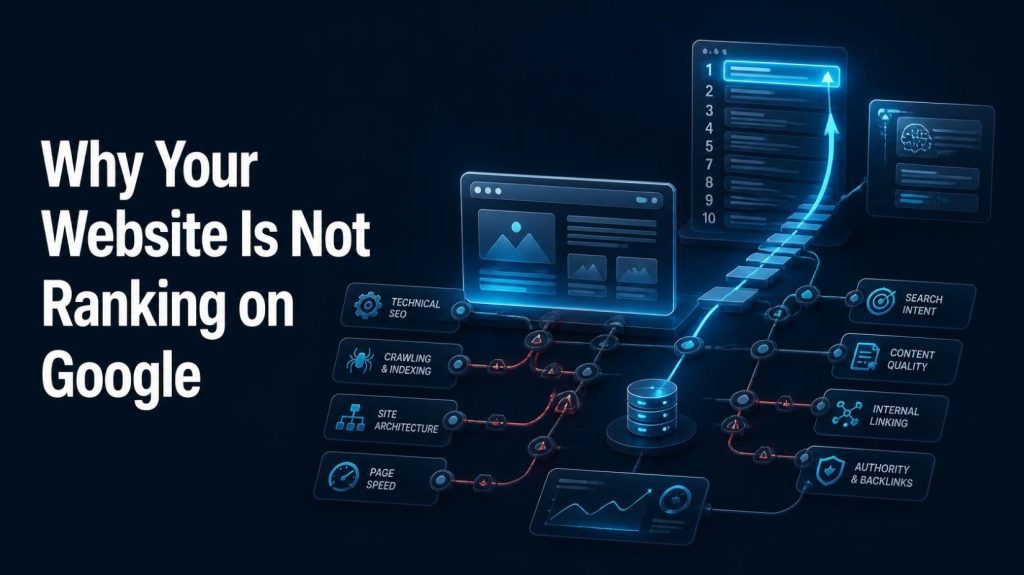
Why Your Website Is Not Ranking on Google
Why is my website not ranking on Google? Usually one of five things is broken: Google has not indexed the page, the content does not match search intent, technical SEO is blocking discovery, the page is too generic to compete, or the site lacks topical authority and relevant backlinks. Diagnose indexing first, then intent, then quality, then authority — in that order. Your website is live. Your pages are published. You picked keywords, wrote them into your titles, and waited. And nothing happened. Google is not sending traffic. That is one of the most frustrating experiences in digital marketing — and one of the most common. But here is the honest truth: “my website is not ranking” almost never has a single cause. It has a chain of causes, and the weakest link breaks the whole chain. A page can fail at any of six stages: discovery, crawling, indexing, relevance, quality, or authority. Fix the wrong stage and you will spend months doing work that never had a chance to matter. This guide is a diagnostic manual, not a list of tips. You will learn how to find out which stage is broken, in what order to check, and what to do about each problem — including how AI-powered search is changing what “ranking” even means. First, Understand What “Not Ranking” Actually Means Before you change anything, define the problem precisely. “Not ranking” describes at least six very different situations — and each one has a different fix. 1. The website is not indexed at all Google has never added your page to its index. The page cannot appear in search results because, from Google’s point of view, it does not exist yet. This is an indexing problem, not a ranking problem. 2. The page is indexed but ranks very low Your page is in the index but sits on page four, six, or ten. Google knows the page exists — it simply does not consider it the best answer for that query. 3. The page ranks for irrelevant keywords You are getting impressions, but for queries you never intended to target. This usually signals a relevance or keyword-mapping problem. 4. The page ranks but gets almost no clicks You appear on page one but your click-through rate is poor. That is usually a title, meta description, or SERP-feature problem, not a ranking problem. 5. The page previously ranked but lost visibility Traffic dropped. This could be an algorithm update, a technical regression, a competitor improvement, seasonality, or a change in search demand. 6. The website ranks for branded searches only People who already know your brand find you. Everyone else finds your competitors. That is an authority and topical relevance problem. Why this matters: if you treat an indexing problem as a content problem, you will rewrite pages that Google has never even read. Diagnose the situation first, then act. The 20 Most Common Reasons Your Website Is Not Ranking Each reason below includes what it looks like, why it matters, and what to do about it. Reason #1 — Google Has Not Indexed Your Page There is a clear sequence every page must pass through before it can rank: Crawled → Indexed → Eligible to appear → Ranked Crawling means Googlebot has discovered and fetched the URL. Indexing means Google has analysed the page and stored it in its index. Ranking is the ordering of indexed pages for a query. A page cannot rank if it was never indexed — and it cannot be indexed if it was never crawled. How to diagnose it: open Google Search Console, paste the URL into the URL Inspection tool, and read the verdict. You will see whether the URL is on Google, whether it was crawled, and whether indexing was blocked. Also check the Pages report under Indexing for site-wide patterns. Common causes: an accidental noindex tag, a robots.txt rule blocking the URL, a canonical tag pointing to a different page, server errors, orphan pages with no internal links, duplicate URLs, or simply a brand-new site Google has not discovered yet. How to fix it: remove the noindex tag, correct the robots.txt rule, fix incorrect canonicals, return a clean 200 status code, add internal links to the page, submit an accurate XML sitemap, and then request indexing in Search Console. Note: requesting indexing does not guarantee that Google will index or rank the page. It simply puts the URL in a queue. Reason #2 — Your Website Has Technical SEO Problems Technical SEO is everything that controls whether Google can access, understand, and trust your site. When it breaks, content quality becomes irrelevant. What to check: Crawlability: can Googlebot reach your important pages? Check robots.txt and Search Console’s Crawl Stats. Indexability: are important pages accidentally blocked by meta robots tags? XML sitemap: does it exist, is it accurate, and does it contain only canonical, indexable URLs? Canonical tags: does each page point to itself as the canonical version? HTTP status codes: are important pages returning 200, and are broken pages returning proper 404s? Redirects: are there redirect chains or loops slowing everything down? HTTPS: is the whole site served securely with no mixed-content warnings? Mobile implementation: does the mobile version contain the same content and links as desktop? JavaScript rendering: if your content only appears after JavaScript runs, verify that Google can actually render it. Internal links and site architecture: can Google reach every important page in a few clicks? How to fix it: run a crawl of your site, fix critical errors first, then warnings. Prioritise anything that blocks indexing or wastes crawl budget. Elementor and WordPress users should also check for plugin conflicts that inject noindex tags or break canonical output. Reason #3 — Your Content Does Not Match Search Intent Search intent is the reason behind the query. Google does not just match keywords — it matches purpose. The main intent types are: Informational: “what is technical SEO” Navigational: “Google Search Console login” Commercial investigation: “best SEO