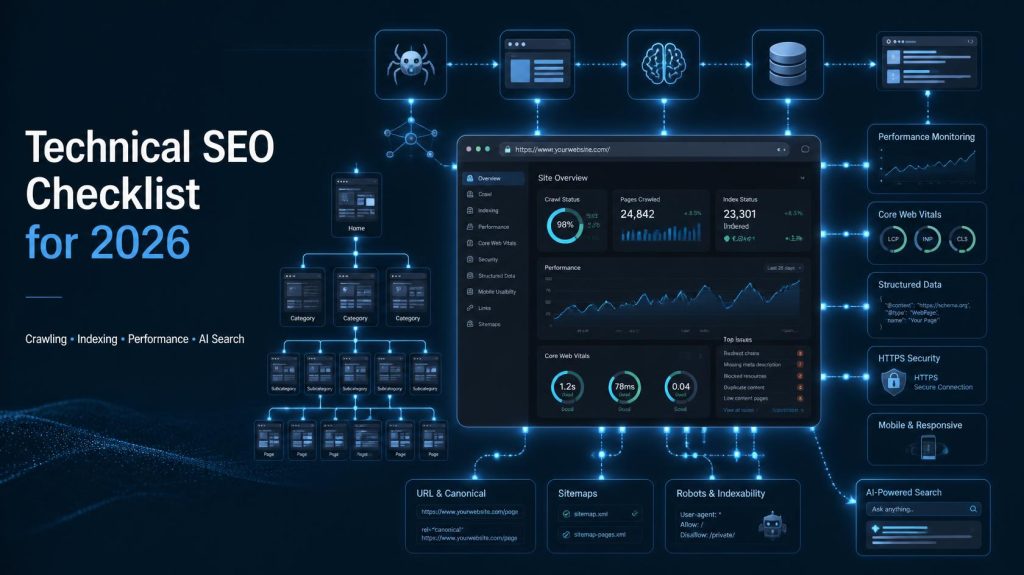
2026 EDITION · UPDATED FOR AI SEARCH
Technical SEO Checklist for 2026
The complete, practical, beginner-to-advanced audit framework for crawling, rendering, indexing, Core Web Vitals, structured data, and AI-powered search visibility.
Crawl · Render · Index · Understand · Surface
Your content can be genuinely excellent. Your backlink profile can be the envy of your niche. Your brand can be the most trusted name in the market. And yet, none of it matters if a search engine cannot crawl your pages, render your JavaScript, understand your structure, or index your most valuable URLs. That is the uncomfortable truth of modern SEO — visibility is permission-based, and technical SEO is how you earn permission.
Search in 2026 is no longer a single blue-link experience. Traditional SERPs, AI Overviews, conversational assistants, and generative answer engines all compete for the same user attention. They share one dependency: they must be able to access, parse, and trust your content before they can surface it anywhere.
This guide is the technical SEO checklist I use when auditing real client websites — from lean SaaS startups to multi-market e-commerce stores. It walks you through crawling, rendering, indexing, Core Web Vitals, structured data, JavaScript SEO, international setup, and the technical foundations that support AEO and GEO. Treat it as a working document, not a one-time read.
What Is Technical SEO?
Technical SEO is the practice of optimizing a website’s infrastructure so search engines can efficiently crawl, render, understand, and index its content. It covers crawling controls, indexing signals, site architecture, performance, mobile usability, structured data, HTTPS, and JavaScript rendering — the foundations that let everything else in SEO actually work.
What Is Technical SEO?
Technical SEO is the engineering side of search optimization. It is everything that happens between a search engine discovering your URL and a user actually seeing your page in a result. Where on-page SEO focuses on content quality and keyword relevance, and off-page SEO focuses on authority and links, technical SEO makes sure those efforts can be found, interpreted, and trusted in the first place.
In practice, technical SEO answers one core question: can search engines access, understand, and use my content? Every task — from robots.txt to canonical tags to INP scores — is a supporting answer to that question.
The five pillars of technical SEO
- Crawling — can search engine bots discover and fetch your URLs?
- Rendering — can they execute the JavaScript needed to see your content?
- Indexing — are pages eligible to be stored and shown in search results?
- Architecture & internal linking — is your site logically structured and navigable?
- Experience & trust — is the site fast, mobile-friendly, secure, and machine-readable?
Technical SEO is not primarily about keyword placement, meta descriptions, or content writing. Those belong to on-page and content SEO. It is also not a magic ranking lever — it removes barriers so that great content and real authority can actually compete.
The distinction that matters: Technical SEO, on-page SEO, off-page SEO, and content SEO are not competing disciplines. They are layers. Technical SEO is the foundation. Break it, and every other layer becomes invisible.
Why Technical SEO Still Matters in 2026
It’s tempting to assume that as search engines get smarter, technical SEO matters less. The opposite is true. The more sophisticated the system, the more dependent it becomes on clean, machine-readable inputs. AI-powered search, entity understanding, and multimodal retrieval all require the same foundation: accessible, structured, trustworthy content.
Why the technical layer remains decisive
- AI Overviews and answer engines still crawl first. Generative systems pull from indexed, renderable, well-structured content. If a page can’t be crawled or rendered, it can’t be cited.
- JavaScript-heavy sites are more common, not less. Modern frameworks (React, Next.js, Vue) introduce rendering complexity that generic SEO advice ignores.
- Mobile-first indexing is the default. Whatever your mobile page delivers is what Google uses for evaluation — desktop parity is not optional.
- Core Web Vitals are a page experience signal. LCP, INP, and CLS are not vanity metrics; they reflect real user friction.
- Large and international sites accumulate technical debt. Faceted navigation, hreflang, parameter bloat, and crawl waste don’t fix themselves.
- E-commerce competition is partly an indexing competition. The store with the cleanest URL and canonical strategy often wins the visibility war.
Important nuance: Technical SEO helps search engines access and understand your content. It does not replace useful content, topical authority, or genuine relevance. Excellent technical SEO with weak content is still a losing strategy.
Technical SEO Checklist for 2026
21 audit categories. Every item includes why it matters, what to check, how to fix it, priority level, and recommended tools.
1. Crawlability
Crawlability is the entry point of technical SEO. If a search engine bot cannot fetch a URL, nothing downstream matters. Crawling and indexing are separate stages — a page can be crawlable but not indexable, and indexable but not indexed.
High Priority
Robots.txt
Why it matters: Robots.txt controls which parts of your site search engine bots can crawl. A single wildcard or misplaced disallow can silently block entire sections from search.
What to check:
- File exists at the root domain (when appropriate)
- Syntax is valid and directives are correctly formatted
- Important pages and resources are not accidentally blocked
- CSS and JS resources are not blocked — Google needs them to render
- Sitemap reference is included where appropriate
- Robots.txt is not being misused to remove already-indexed URLs
How to fix it: Audit directives line by line in Search Console’s robots.txt report. Remember — crawl control ≠ index control. Blocking crawling in robots.txt does not guarantee removal from the index; you need a noindex directive or URL removal request.
Tools: Google Search Console, Screaming Frog, Sitebulb
High Priority
XML Sitemap
Why it matters: Sitemaps are a direct communication channel with search engines. They help discovery, especially for new or deeply nested URLs.
What to check:
- XML sitemap exists and returns a 200 status
- Only canonical, indexable URLs are included
- No 404s, redirects, or noindex URLs listed
- Sitemap index is used for large sites (50,000+ URLs or 50MB+)
- Submitted in Google Search Console
- Automatically updated as content changes
What NOT to include: Non-canonical URLs, noindex pages, redirects, 404s, staging URLs, paginated pages (usually), and duplicate parameter variations.
Tools: Screaming Frog, XML-Sitemaps.com, Search Console
Medium Priority
Crawlable Internal Links
Why it matters: Links are how crawlers discover and traverse your site. If your most important page has no crawlable internal links pointing to it, it may never be discovered — or may be treated as low priority.
What to check:
- Important pages are reachable via real HTML links (not JavaScript-only)
- Navigation follows a logical hierarchy
- No orphan pages exist
- Anchor text is descriptive and relevant
- No important pages are hidden behind forms or interactive-only elements
How to fix it: Add contextual internal links from relevant pages, ensure navigation is crawlable, and audit for orphan pages quarterly.
Tools: Screaming Frog, Sitebulb, Ahrefs Site Audit
2. Indexability
Indexability is the next gate. A page can be crawlable but still excluded from Google’s index because of conflicting signals. Understanding the difference between crawlable ≠ indexable ≠ indexed is essential.
High Priority
Indexing Status
Why it matters: A page that is not indexed cannot appear in search results. Silent indexing failures are one of the most common — and most damaging — technical SEO problems.
What to check:
- Important pages return a 200 status and are indexable
- No accidental noindex directives in meta tags or HTTP headers
- No conflicting signals (e.g., robots.txt blocking + canonical pointing to the page)
- Canonical tags point to the intended URL
- Pages are included in the sitemap and internally linked
How to fix it: Use URL Inspection in Search Console to test live URLs. Check meta robots, X-Robots-Tag headers, robots.txt, and canonicals together — conflicts are common.
Tools: Google Search Console, Screaming Frog, Chrome DevTools
High Priority
Meta Robots Directives
Why it matters: Meta robots directives control page-level indexing and link-following behavior. Misapplied directives are a leading cause of traffic loss during site updates.
What to check:
index/noindex— is the correct directive applied to the right pages?follow/nofollow— is link equity flowing as intended?- No conflicting directives across meta tags and HTTP headers
- Staging or development noindex tags removed before launch
Important nuance: Directives do not behave identically in every context. A noindex page can still be crawled and can still pass link equity if followed. Test with URL Inspection and Rich Results Test.
Tools: Chrome DevTools, Screaming Frog, Search Console
3. Canonicalization
Canonical tags tell search engines which version of a URL is the preferred one when multiple URLs serve similar or identical content. They are hints, not commands — but ignoring them creates duplication chaos.
High Priority
Canonical Tags
Why it matters: Without clear canonicalization, search engines may pick a different URL than you intend — splitting signals, diluting authority, and creating duplicate content confusion.
What to check:
- Canonical tag exists on all indexable pages (self-referencing where appropriate)
- Canonical URL is absolute, valid, and returns 200
- Canonical points to the preferred, canonical version
- HTTP and HTTPS versions are consolidated
- www and non-www versions are consistent
- Parameter variations have correct canonical signals
- Canonical does not conflict with redirects or internal links
- Pagination, filters, and sort parameters are handled deliberately
How to fix it: Audit canonical tags against actual URL patterns. Ensure internal links and sitemaps point to canonical versions. Never mix signals — if you redirect A to B, A should not canonical to C.
Key principle: Canonicalization is a hint, not an absolute command. Google may override your canonical if other signals (internal links, sitemaps, redirects) suggest a different preference.
Tools: Screaming Frog, Sitebulb, Search Console URL Inspection
4. URL Structure
Medium Priority
URL Best Practices
Why it matters: Clean URLs improve crawlability, readability, and click-through. They are also easier to share and maintain.
What to check:
- Short, descriptive, human-readable URLs
- Logical hierarchy (
/category/subcategory/page) - Lowercase consistency
- No unnecessary parameters or session IDs
- Avoid excessive folder depth
- Consistent trailing slash strategy (pick one, enforce it)
- HTTPS everywhere
- No meaningless strings or auto-generated IDs where avoidable
When changing URLs is risky: Every URL change requires a 301 redirect, updated internal links, updated sitemaps, and updated canonicals. On large sites, URL migrations without a mapping plan cause significant traffic loss.
Tools: Screaming Frog, Sitebulb, Google Search Console
5. Redirects & Status Codes
HTTP status codes tell search engines what happened to a URL. Misconfigured redirects and status codes are among the most common causes of lost rankings during site changes.
| Status / Issue | Meaning | SEO Concern | Recommended Action |
|---|---|---|---|
| 301 | Permanent redirect | Passes signals to target | Use for permanent moves; update internal links |
| 302 | Temporary redirect | Signals may not fully pass | Use only for temporary; switch to 301 when permanent |
| 404 | Not found | Page removed or broken link | Fix if valuable; 410 if permanently gone |
| 410 | Gone permanently | Explicit removal signal | Use for permanently removed content |
| 5xx | Server error | Crawl budget waste; indexing failure | Fix server issues immediately |
| Redirect chain | Multiple hops | Slower crawling; diluted signals | Collapse to a single 301 |
| Redirect loop | Circular redirects | Page unreachable | Break the loop immediately |
| Soft 404 | Returns 200 but content missing | Wasted indexing; poor UX | Return proper 404 or restore content |
Tools: Screaming Frog, Sitebulb, Search Console Page Indexing report
6. HTTPS & Security
High Priority
HTTPS Configuration
Why it matters: HTTPS protects user data and is expected by modern browsers. It supports trust and is part of a healthy technical foundation — though it should not be oversold as a standalone ranking boost.
What to check:
- HTTPS is enabled sitewide
- HTTP URLs 301 redirect to HTTPS equivalents
- SSL/TLS certificate is valid and not expired
- No mixed content (HTTP resources loaded on HTTPS pages)
- Canonical URLs consistently use HTTPS
- All internal and external resource references are secure
Tools: Why No Padlock, Chrome DevTools Security panel, SSL Labs
7. Mobile SEO
Mobile-first indexing means Google predominantly uses the mobile version of your content for indexing and ranking. If your mobile page hides important content, that content effectively doesn’t exist for search.
High Priority
Mobile-First Readiness
What to check:
- Responsive design across all breakpoints
- Same important content on mobile and desktop
- Same structured data where applicable
- Mobile navigation is crawlable and functional
- Internal links work on mobile
- Readable font sizes without zooming
- Tap targets are adequately sized and spaced
- Images are optimized for mobile
- JavaScript functionality works on mobile
- No mobile-only content loss (hidden content that’s essential for understanding the page)
Tools: Chrome DevTools Device Mode, Search Console Mobile Usability, PageSpeed Insights
8. Core Web Vitals & Performance
Core Web Vitals are a set of metrics that measure real-world user experience. In 2026, the three metrics that matter are LCP, INP, and CLS. They are page experience signals — not standalone ranking guarantees, but meaningful indicators of quality.
LCP — Largest Contentful Paint
What it measures: How long it takes for the largest visible element (usually a hero image or heading) to render.
What causes poor LCP: Slow server response, render-blocking resources, unoptimized images, lazy loading the hero image, third-party scripts.
How to improve it: Optimize server response time, preload the LCP image, use modern image formats (WebP/AVIF), eliminate render-blocking CSS/JS, use a CDN.
Target: ≤ 2.5 seconds
INP — Interaction to Next Paint
What it measures: The responsiveness of the page to user interactions (clicks, taps, key presses).
What causes poor INP: Heavy JavaScript execution, long tasks blocking the main thread, excessive event listeners, hydration issues in frameworks.
How to improve it: Break up long tasks, defer non-critical JavaScript, optimize event handlers, reduce third-party script impact, use web workers where appropriate.
Target: ≤ 200 milliseconds
CLS — Cumulative Layout Shift
What it measures: Visual stability — how much the page layout shifts unexpectedly during loading.
What causes poor CLS: Images without dimensions, ads/embeds without reserved space, dynamically injected content, web fonts causing FOIT/FOUT.
How to improve it: Always set width/height on images and videos, reserve space for ads and embeds, use font-display: swap, avoid inserting content above existing content.
Target: ≤ 0.1
Additional performance levers: image optimization, lazy loading (below the fold), JavaScript/CSS minification, font loading strategy, browser caching, CDN usage, server response time, third-party script auditing, and resource prioritization.
Important: Perfect Core Web Vitals do not guarantee high rankings. They are one input among many. But poor CWV correlates with poor user experience — and that matters.
Tools: PageSpeed Insights, Search Console Core Web Vitals report, Chrome DevTools Lighthouse, web-vitals library
9. JavaScript SEO
JavaScript-heavy websites introduce rendering complexity that generic SEO advice often ignores. Google can render JavaScript, but rendering is resource-intensive and not guaranteed to work perfectly every time.
High Priority
JavaScript Rendering
Why it matters: If critical content or links only appear after JavaScript executes, search engines may miss them — especially if rendering fails or is delayed.
What to check:
- Rendering strategy: client-side (CSR), server-side (SSR), static generation (SSG), or hybrid
- JavaScript-generated links are crawlable
- JavaScript-generated content appears in rendered HTML
- No rendering failures in Search Console URL Inspection
- Lazy-loaded content is accessible to crawlers
- Hydration problems don’t break content visibility
- Dynamic rendering is used appropriately (where relevant)
How to test: Use Search Console URL Inspection “Test Live URL” to see rendered HTML. Compare with “View Source” to identify content that only exists after JavaScript execution.
Tools: Search Console URL Inspection, Chrome DevTools, Screaming Frog (JavaScript rendering mode), Puppeteer
10. Website Architecture
Site architecture determines how link equity flows, how easily crawlers discover content, and how well users navigate. A strong architecture serves both audiences simultaneously.
Medium Priority
Architecture Checklist
- Logical hierarchy from homepage to deep pages
- Clear category and subcategory structure
- Topic clusters with supporting content
- Important pages are no more than 3–4 clicks from the homepage
- Breadcrumbs implemented and marked up
- No orphan pages
- Pagination handled correctly (crawlable, indexable strategy)
- Internal linking supports priority pages
Tools: Screaming Frog (crawl depth), Sitebulb, Ahrefs Site Audit
11. Internal Linking
Internal links serve two purposes: navigation (helping users and crawlers move through the site) and contextual relationships (signaling topical relevance between pages).
High Priority
Internal Linking Checklist
- Important pages receive internal links from relevant pages
- Contextual links within body content (not just navigation)
- Descriptive anchor text (avoid “click here” and “read more”)
- No excessive repetition of the same anchor text
- Broken internal links fixed promptly
- Orphan pages identified and linked
- Commercial pages supported by relevant informational content
- Link equity flows to priority pages
How to fix it: Run a full crawl, identify orphan pages and pages with weak internal link profiles, and add contextual links from relevant high-authority pages. For e-commerce, ensure category pages link to key product pages and vice versa.
Tools: Screaming Frog, Sitebulb, Ahrefs Site Audit
12. Duplicate Content
Duplicate content is not a penalty — it’s a signal dilution problem. When multiple URLs serve similar content, search engines must choose which to show, and your preferred version may not win.
Common Duplicate Content Sources
- Exact duplicates (same content, different URLs)
- Near duplicates (minor variations)
- URL parameter variations
- Product variations (size, color)
- HTTP vs HTTPS duplication
- www vs non-www duplication
- Trailing slash duplication
- Printer-friendly pages
- Filter and sort pages
- Thin pages with little unique content
Solutions: Canonicalization, 301 redirects, noindex where appropriate, content consolidation, better information architecture.
Important: Duplicate content does not automatically cause a Google penalty. Google’s documented approach is to group duplicates and select a canonical version — not to penalize sites for having them.
13. Structured Data / Schema
Structured data helps search engines understand the meaning of your content. It does not guarantee rich results, but it improves clarity and eligibility for enhanced SERP features.
Relevant Schema Types
- Article — for blog posts and news content
- BreadcrumbList — for navigation trails
- Organization — for brand information
- LocalBusiness — for physical locations
- Product — for e-commerce product pages
- Review / AggregateRating — for reviews (where eligible)
- Event — for event listings
- VideoObject — for video content
- FAQPage — where appropriate and eligible
Key principle: Only implement schema that accurately represents visible, eligible page content. Do not add schema simply because it exists — misleading structured data can trigger manual actions.
Validation: Use Google’s Rich Results Test and Schema Markup Validator. Monitor enhancements in Search Console.
Tools: Rich Results Test, Schema Markup Validator, Search Console Enhancements reports
14. Image SEO
Image Optimization Checklist
- Descriptive, keyword-relevant filenames
- Alt text that accurately describes meaningful images (primarily for accessibility)
- Correct image dimensions (avoid oversized images scaled down by CSS)
- Responsive images using
srcsetandsizes - Modern formats (WebP, AVIF) where supported
- Compression without visible quality loss
- Lazy loading for below-the-fold images
- Images are indexable (not blocked by robots.txt)
- Relevant context around images (captions, surrounding text)
- Avoid unnecessary large files that hurt LCP and bandwidth
Tools: PageSpeed Insights, Squoosh, ImageOptim, Screaming Frog
15. Video SEO
Video SEO Checklist
- Video discoverability (on-page placement, not just embedded iframes)
- VideoObject structured data where appropriate
- Compelling, relevant thumbnails
- Relevant page context and supporting text
- Captions and transcripts for accessibility and indexation
- Video sitemap for video-heavy sites
- Performance considerations (don’t let video players kill LCP/INP)
Tools: Search Console Video indexing report, Rich Results Test
16. International SEO
Hreflang & International Setup
What to check:
- Correct language-region targeting (e.g., en-US, en-GB, es-MX)
- Reciprocal hreflang references (if A references B, B must reference A)
- Valid URLs in hreflang annotations
- Consistent canonicalization with hreflang
- No conflicting signals between hreflang and canonicals
- Country targeting set appropriately in Search Console
- Language targeting configured correctly
- Duplicate localized pages handled
- International site architecture is logical (subdirectories, subdomains, or ccTLDs)
Tools: Screaming Frog (hreflang audit), Sitebulb, Search Console International Targeting
17. E-commerce Technical SEO
E-commerce Checklist
- Clean, stable product URLs
- Product variant handling (canonical strategy for size/color)
- Out-of-stock product strategy (keep, redirect, or 410?)
- Faceted navigation crawl control
- Filter and sort parameter handling
- Pagination crawlable and indexable where appropriate
- Product schema implemented correctly
- Category pages optimized for discovery
- Internal linking between categories and products
- Duplicate product pages consolidated
- Canonical tags reviewed across variants
- Parameter handling in Search Console
- Inventory changes managed without URL churn
Tools: Screaming Frog, Sitebulb, Search Console, Google Merchant Center
18. Local SEO Technical Foundations
Local Technical Checklist
- Consistent business information across the site
- LocalBusiness structured data where appropriate
- Location pages for each physical location
- NAP (Name, Address, Phone) consistency
- Crawlable contact information
- Local landing pages with unique content
- Mobile usability for local searches
Note: Local SEO is not purely technical. Reviews, citations, and proximity all play major roles. Technical foundations support but do not replace those factors.
19. Search Console Monitoring
Google Search Console is the single most important free tool for technical SEO monitoring. It provides direct feedback from Google about how your site is being crawled, indexed, and experienced.
Key Search Console Reports
- Indexing reports — Page indexing, sitemaps, removals
- URL Inspection — test individual URLs for crawl, render, and index status
- Core Web Vitals — real-world performance data
- HTTPS report — security issues where available
- Manual actions — any penalties applied
- Security issues — malware or hacking alerts
- Search performance — queries, pages, countries, devices
- Sitemaps — submission status and discovered URLs
How to use it: Set up weekly monitoring for critical issues, monthly reviews of indexing and CWV trends, and immediate investigation after site changes. Do not treat every warning as equally urgent.
20. Log Files & Advanced Technical SEO
Server log analysis is an advanced technique that reveals exactly how search engine bots crawl your site. It is particularly valuable for large websites where crawl budget is a real constraint.
What Log Analysis Reveals
- How often Googlebot crawls your site
- Which URLs are crawled most frequently
- Crawl waste (low-value URLs consuming resources)
- Important vs low-value URL crawl patterns
- Status codes returned to crawlers
- Whether new content is discovered quickly
- Impact of site changes on crawl behavior
When it matters most: Large e-commerce sites, marketplaces, news sites, and any site with 100,000+ URLs or faceted navigation.
Tools: Screaming Frog Log File Analyser, custom scripts, server log tools
21. AI Search, AEO & GEO
AI-powered search experiences — from AI Overviews to conversational assistants — depend on the same technical foundations as traditional search. They must be able to crawl, render, understand, and trust your content before they can surface it.
AI Search Technical Foundations
- Machine-readable content structure
- Clear page hierarchy and headings
- Entity clarity (consistent naming, context, relationships)
- Structured data that accurately represents content
- Accessible content (not blocked by robots.txt or noindex)
- Strong internal linking for contextual understanding
- Author and organization information
- Trust signals (HTTPS, contact info, credentials)
- Helpful, people-first content
- Original information and genuine expertise
- Consistent business information across the web
The distinction: Technical SEO supports discoverability and understanding. AEO (Answer Engine Optimization) and GEO (Generative Engine Optimization) focus more on making information useful, extractable, and trustworthy for answer engines and generative systems.
Important: No technical tactic guarantees inclusion in AI-generated answers. GEO aims to improve the likelihood that content is understandable, useful, and discoverable — not to manipulate citations.
Technical SEO Checklist — Quick Audit Table
| Area | What to Check | Priority | Suggested Tool |
|---|---|---|---|
| Crawlability | Robots.txt syntax and blocked resources | High | Search Console |
| Crawlability | XML sitemap accuracy and coverage | High | Screaming Frog |
| Crawlability | Crawlable internal links | Medium | Sitebulb |
| Indexability | Noindex directives on important pages | High | Search Console |
| Indexability | Indexing status of priority URLs | High | URL Inspection |
| Canonicalization | Canonical tag accuracy and consistency | High | Screaming Frog |
| URL Structure | Readable, consistent, lowercase URLs | Medium | Sitebulb |
| Redirects | 301 chains, loops, and broken redirects | High | Screaming Frog |
| Status Codes | 404s, 5xx errors, soft 404s | High | Search Console |
| HTTPS | Valid SSL, no mixed content | High | Chrome DevTools |
| Mobile SEO | Mobile content parity and usability | High | PageSpeed Insights |
| Core Web Vitals | LCP, INP, CLS scores | High | PageSpeed Insights |
| JavaScript SEO | Rendered content and links | High | URL Inspection |
| Architecture | Crawl depth and site hierarchy | Medium | Screaming Frog |
| Internal Linking | Orphan pages and link equity flow | High | Sitebulb |
| Duplicate Content | URL parameter and version duplication | Medium | Screaming Frog |
| Structured Data | Schema accuracy and eligibility | Medium | Rich Results Test |
| Image SEO | Alt text, formats, dimensions | Low | PageSpeed Insights |
| Video SEO | VideoObject schema and indexing | Low | Search Console |
| International SEO | Hreflang reciprocity and accuracy | High | Screaming Frog |
| E-commerce | Faceted navigation and product canonicals | High | Sitebulb |
| Local SEO | LocalBusiness schema and NAP | Medium | Search Console |
| Search Console | Indexing and CWV reports | High | Search Console |
| Log Files | Crawl waste and bot behavior | Low | Screaming Frog Log Analyser |
| AI Search | Machine-readable structure and entities | Medium | Manual review |
Technical SEO Tools for 2026
You do not need every tool. Start with free search-engine tools, then add crawling and auditing tools as your needs grow.
Free / Search-Engine Tools
- Google Search Console — indexing, performance, CWV, sitemaps, manual actions
- Google PageSpeed Insights — Core Web Vitals and performance diagnostics
- Rich Results Test — structured data validation
- Chrome DevTools — rendering, network, performance, mobile testing
- Schema Markup Validator — schema syntax validation
Crawling / Auditing Tools
- Screaming Frog — deep crawling, log analysis, JS rendering
- Sitebulb — visual audits, crawl depth, internal linking
- Semrush — site audits, position tracking, competitor analysis
- Ahrefs — site audits, backlinks, technical monitoring
Recommendation: Start with Search Console + PageSpeed Insights + Screaming Frog (free tier). Add paid tools when your site size or complexity demands it.
How Often Should You Perform a Technical SEO Audit?
- Weekly monitoring — Search Console alerts, critical errors, security issues
- Monthly checks — indexing trends, Core Web Vitals, broken links, redirect health
- Quarterly audits — full crawl, architecture review, internal linking, schema validation
- After major website changes — new features, CMS updates, plugin changes
- After migrations — URL mapping, redirects, canonicals, sitemaps, indexing verification
- After redesigns — rendering, mobile parity, performance, structured data
Large websites (10,000+ URLs, e-commerce, marketplaces) benefit from more frequent monitoring, especially for crawl budget and index coverage.
Technical SEO Audit Priority Framework
Critical
Issues affecting crawling, indexing, major site accessibility, security, or large numbers of URLs. Fix immediately.
High
Issues affecting important pages, performance, internal linking, or canonicalization. Fix within days to weeks.
Medium
Issues affecting optimization quality, UX, or site structure. Fix within weeks to months.
Low
Minor issues with limited SEO impact. Address as part of ongoing maintenance.
Prioritization formula: Impact × Scale × Business Value × Fix Difficulty. A high-impact issue affecting 100,000 URLs is almost always more urgent than a low-impact issue on 10 pages.
Common Technical SEO Mistakes in 2026
- Blocking important pages in robots.txt — silently removes pages from search. Audit directives regularly.
- Accidentally applying noindex — common after staging pushes. Always verify before launch.
- Incorrect canonical tags — pointing to wrong URLs dilutes signals. Audit canonical accuracy.
- Broken redirects and redirect chains — slow crawling and dilute link equity. Collapse chains to single 301s.
- Orphan pages — pages with no internal links are hard to discover. Add contextual internal links.
- Poor mobile implementation — content parity issues hurt mobile-first indexing. Test mobile regularly.
- Slow pages — poor LCP, INP, or CLS frustrate users and hurt page experience. Monitor CWV.
- JavaScript rendering problems — content invisible to crawlers. Test rendered HTML.
- Incorrect hreflang — non-reciprocal or invalid references confuse international targeting.
- Invalid structured data — ineligible or misleading schema can trigger manual actions.
- Duplicate URLs — parameter and version duplication splits signals. Canonicalize deliberately.
- Huge crawl waste — low-value URLs consume crawl budget. Use robots.txt and canonicalization.
- Ignoring Search Console — the most direct feedback from Google goes unread.
- Treating every warning as equally important — prioritize by impact, scale, and business value.
Technical SEO Myths You Should Stop Believing
- “More indexed pages always means better SEO.” — Index bloat of low-value pages can dilute quality signals. Quality over quantity.
- “Robots.txt removes pages from Google.” — Robots.txt controls crawling, not indexing. Use noindex for removal.
- “Duplicate content always causes a penalty.” — Google groups duplicates and picks a canonical. It’s not a penalty.
- “Perfect Core Web Vitals guarantee rankings.” — CWV is a page experience signal, not a standalone ranking factor.
- “Schema markup guarantees rich results.” — Schema improves eligibility, not guaranteed display.
- “Every 404 is an SEO emergency.” — 404s are normal. Fix valuable broken links; ignore irrelevant ones.
- “More backlinks can fix every technical SEO problem.” — Links don’t fix crawl, render, or index issues.
- “Technical SEO is a one-time project.” — It’s ongoing maintenance, especially for large or dynamic sites.
The Future of Technical SEO
Technical SEO is evolving alongside AI-powered search, more complex web applications, and multimodal search experiences. But the durable principles remain unchanged.
- Accessibility — content must be reachable by crawlers and users
- Clarity — structure and meaning must be machine-readable
- Performance — fast, stable experiences earn attention
- Discoverability — strong architecture and internal linking
- Structured information — schema, entities, and consistent signals
- Trustworthy content — expertise, accuracy, and transparency
As AI search grows, these foundations become more important, not less. Systems that can’t access or understand your content can’t surface it — no matter how good the content is.
Frequently Asked Questions
What is Technical SEO?
Technical SEO is the practice of optimizing a website’s infrastructure so search engines can efficiently crawl, render, understand, and index its content. It covers crawling controls, indexing signals, architecture, performance, mobile usability, structured data, HTTPS, and JavaScript rendering.
What is included in a Technical SEO audit?
A technical SEO audit covers crawlability, indexability, canonicalization, URL structure, redirects, status codes, HTTPS, mobile SEO, Core Web Vitals, JavaScript rendering, site architecture, internal linking, duplicate content, structured data, image and video SEO, international SEO, e-commerce specifics, Search Console monitoring, log files, and AI search readiness.
Is Technical SEO still important in 2026?
Yes. As search becomes more AI-driven, the technical foundation matters more, not less. AI systems still need to crawl, render, understand, and trust content before surfacing it. Technical SEO ensures that foundation is solid.
What is the most important Technical SEO factor?
There is no single factor. Crawlability and indexability are foundational — without them, nothing else matters. After that, site architecture, internal linking, and performance are high-impact areas.
How do I check if my website is indexed?
Use Google Search Console’s URL Inspection tool to test individual URLs. For a broader view, use the Pages report under Indexing to see how many pages are indexed and any indexing issues.
What is the difference between crawling and indexing?
Crawling is the process of discovering and fetching URLs. Indexing is storing and organizing that content for search results. A page can be crawled but not indexed if it’s blocked, noindexed, or deemed low quality.
How important are Core Web Vitals?
Core Web Vitals (LCP, INP, CLS) are page experience signals that reflect real user friction. They are not standalone ranking factors, but they correlate with user experience and are worth monitoring and improving.
What is a canonical tag?
A canonical tag tells search engines which version of a URL is the preferred one when multiple URLs serve similar content. It is a hint, not an absolute command, and should be consistent with internal links, sitemaps, and redirects.
What does robots.txt do?
Robots.txt controls which parts of your site search engine bots can crawl. It does not remove pages from the index — use noindex directives for that. Misconfigured robots.txt can block important resources.
How often should a Technical SEO audit be performed?
Weekly monitoring for critical issues, monthly checks for indexing and performance, quarterly full audits, and immediate audits after site changes, migrations, or redesigns. Large sites may need more frequent monitoring.
What tools can I use for Technical SEO?
Start with Google Search Console, PageSpeed Insights, Rich Results Test, and Chrome DevTools. Add Screaming Frog, Sitebulb, Semrush, or Ahrefs as your needs grow. You don’t need every tool.
Does Technical SEO help AI search?
Yes. AI search systems depend on the same technical foundations as traditional search. Machine-readable content, clear structure, entity clarity, accessible pages, and strong internal linking all support AI discoverability. However, technical SEO does not guarantee inclusion in AI-generated answers.
Technical SEO Is How You Earn Permission to Be Found
Technical SEO is not about chasing every warning in an audit tool. It is about ensuring a reliable path from discovery to visibility: search engines can discover → crawl → render → understand → index → interpret → surface your website’s valuable content.
In 2026, that path serves both traditional search and AI-powered search experiences. The businesses that invest in clean crawling, correct indexing, fast performance, logical architecture, and machine-readable structure give themselves the best chance of being found — in any search environment.
Start with the highest-impact items: crawlability, indexability, canonicalization, and Core Web Vitals. Build a repeatable audit process. Monitor Search Console weekly. Then iterate from a position of stability rather than reactivity.
Download the 40-Point Technical SEO Checklist →
40-Point Technical SEO Checklist
Crawlability
- Robots.txt syntax and directives
- XML sitemap accuracy
- Crawlable internal links
- CSS/JS not blocked
- Sitemap submitted in GSC
- No accidental disallows
- Crawl depth under control
Indexability
- No accidental noindex
- Canonicals accurate
- Status codes correct
- Sitemap only canonical URLs
- No conflicting signals
- Priority pages indexed
- Index bloat controlled
Performance
- LCP ≤ 2.5s
- INP ≤ 200ms
- CLS ≤ 0.1
- Image optimization
- JS/CSS minification
- Caching and CDN
- Server response time
Mobile
- Responsive design
- Content parity
- Tap targets
- Readable font sizes
- Mobile navigation
- Mobile internal links
Architecture
- Logical hierarchy
- Orphan pages identified
- Crawl depth ≤ 4 clicks
- Breadcrumbs
- Pagination handled
- Topic clusters
Security
- HTTPS enabled
- HTTP → HTTPS redirects
- Valid SSL certificate
- No mixed content
- Secure resource references
Structured Data
- Valid schema
- Relevant schema only
- Accurate representation
- Rich Results Test passed
- Schema matches visible content
Advanced
- Hreflang reciprocity
- Log file analysis
- Faceted navigation control
- JavaScript rendering test
- AI search readiness
- Search Console monitoring
SEO Metadata & Optimization Notes
SEO Title
Technical SEO Checklist for 2026: Complete Audit Guide
Meta Description
The definitive technical SEO checklist for 2026. Audit crawling, indexing, Core Web Vitals, schema, JavaScript SEO, and AI search readiness with this practical guide.
URL Slug
/technical-seo-checklist-2026/
Primary Keyword
Technical SEO Checklist for 2026
Secondary Keywords
technical SEO, technical SEO audit, SEO checklist 2026, technical SEO best practices, crawlability, indexability, Core Web Vitals, JavaScript SEO, structured data, canonical tags, robots.txt, XML sitemap, AEO, GEO, E-E-A-T
Search Intent
Informational + Practical + Commercial Investigation + Professional/Advanced
Suggested H1
Technical SEO Checklist for 2026
Featured Snippet / AEO Opportunities
- What is Technical SEO? — Paragraph (40–60 words)
- What is included in a Technical SEO audit? — List
- Crawling vs indexing — Paragraph
- Core Web Vitals explained — Table
- Technical SEO checklist — List/Table
- How often to audit — List
- Robots.txt vs noindex — Paragraph
- Canonical tags explained — Paragraph
Schema Recommendations
- Article — for the blog post itself
- BreadcrumbList — for navigation
- Organization — for agency information
- WebSite — for site-level identity
- FAQPage — where eligible and appropriate
- LocalBusiness — if the agency has a physical location
Image Suggestions
- Hero: Technical SEO Audit Dashboard — filename:
technical-seo-audit-dashboard-2026.webp— alt: “Technical SEO audit dashboard showing crawl, index, and performance metrics” - Crawling & Indexing Diagram — filename:
crawling-indexing-rendering-diagram.webp— alt: “Diagram showing how search engines crawl, render, and index web pages” - Core Web Vitals Visualization — filename:
core-web-vitals-lcp-inp-cls.webp— alt: “Core Web Vitals metrics LCP INP CLS visualized” - SEO Architecture Diagram — filename:
seo-website-architecture-diagram.webp— alt: “SEO-friendly website architecture with logical hierarchy” - Robots.txt & Sitemap Concept — filename:
robots-txt-xml-sitemap-concept.webp— alt: “Robots.txt and XML sitemap concept illustration” - SEO + AEO + GEO Ecosystem — filename:
seo-aeo-geo-ecosystem.webp— alt: “SEO AEO GEO ecosystem showing traditional and AI search”
Internal Linking Suggestions
- “SEO services” → SEO Services page → Introduction section
- “On-page SEO” → On-Page SEO page → What Is Technical SEO section
- “local SEO” → Local SEO page → Local SEO Technical Foundations section
- “content marketing” → Content Marketing page → E-E-A-T section
- “web development” → Web Development page → JavaScript SEO section
- “AEO services” → AEO Services page → AI Search, AEO & GEO section
- “AI search optimization” → AI Search Optimization page → Future of Technical SEO section
- “digital marketing services” → Digital Marketing Services page → Conclusion